

Form
# Form
# Description
Form renders a form from FormXml, columns, data, and metadata that you provide through a Dataverse client API web resource.
# Visual example
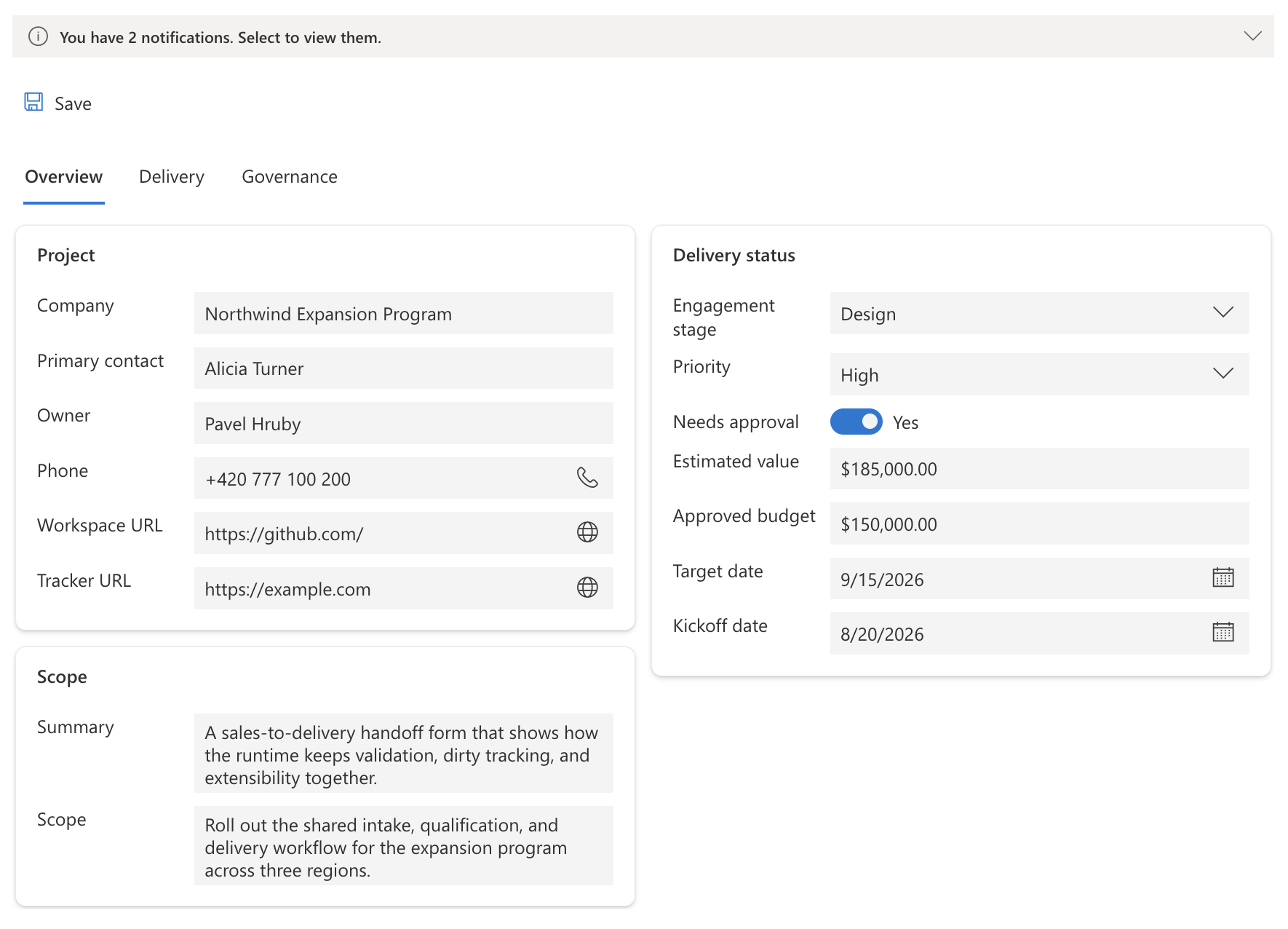 Form rendering a record with a notification bar, Save button, tabbed layout, and mixed field types across two columns.
# Bindings
| Property Name | Description | Of Type | Input | Output | Usage | Required |
|---|---|---|---|---|---|---|
| bindingField | Bound multiline text field for the PCF host slot. | Multiple | N/A | N/A | bound | true |
| ClientApiWebResourceName | JavaScript web resource that contains the handler functions. | SingleLine.Text | form-script.js | N/A | input | true |
| ClientApiConfigFunctionName | Function called first to provide the form config. | SingleLine.Text | onLoadConfig | N/A | input | true |
| ClientApiFormContextFunctionName | Function called after the form is ready and receives formContext. | SingleLine.Text | onGetFormContext | N/A | input | false |
| Height | Not fully supported at the moment. When set to 100%, it currently only adds extra padding around the control. | SingleLine.Text | 100% | N/A | input | false |
# Integration model
# Runtime flow
At runtime the control:
- Calls
Xrm.Utility.executeFunction(ClientApiWebResourceName, ClientApiConfigFunctionName, [{ setConfig }]) - Expects that function to call
setConfig(...) - Builds the form from that config
- If
ClientApiFormContextFunctionNameis set, callsXrm.Utility.executeFunction(ClientApiWebResourceName, ClientApiFormContextFunctionName, [{ formContext }])
# Web resource contract
Your JavaScript web resource should expose a config function like this:
function onLoadConfig(api) {
  api.setConfig({
    formXml,
    columns,
    data,
    metadata,
    onSave,
  });
}
2
3
4
5
6
7
8
9
If you also want the runtime form context, add a second function:
function onGetFormContext(params) {
  const { formContext } = params;

  formContext.ui.setFormNotification("Loaded", "INFO", "loaded");
}
2
3
4
5
Typical property values then look like:
ClientApiWebResourceName:form-script.jsClientApiConfigFunctionName:onLoadConfigClientApiFormContextFunctionName:onGetFormContext
# Config shape
The config passed to setConfig(...) supports this shape:
{
  formXml: string;
  columns: IColumn[];
  data?: Record<string, any>;
  metadata: {
    PrimaryIdAttribute: string;
    PrimaryNameAttribute: string;
  };
  onSave?: (params: {
    recordId: string;
    updatedData: Record<string, any>;
  }) => Promise<
    | { success: true }
    | { success: false; error: string }
  >;
}
2
3
4
5
6
7
8
9
10
11
12
13
14
15
16
Note:
formXml,columns, andmetadataare required.datais optional — when omitted, the form starts with an empty record object.
# Columns
columns is the field-definition array for the record. Each item describes one field that the form can bind to, including its logical name, display name, and data type.
In practice, this should follow the same IColumn[] shape used by the rest of the Base Controls stack.
const columns = [
  {
    name: "name",
    alias: "name",
    displayName: "Name",
    dataType: "SingleLine.Text",
    metadata: { IsValidForUpdate: true },
  },
  {
    name: "primarycontactid",
    alias: "primarycontactid",
    displayName: "Primary Contact",
    dataType: "Lookup.Simple",
    metadata: {
      IsValidForUpdate: true,
      Targets: ["contact"],
    },
  },
];
2
3
4
5
6
7
8
9
10
11
12
13
14
15
16
17
18
19
Column definitions
# Metadata
metadata is the minimal record-level metadata object:
{
  PrimaryIdAttribute: string;
  PrimaryNameAttribute: string;
}
2
3
4
PrimaryIdAttribute identifies the record id field and PrimaryNameAttribute identifies the primary text field for the record.
# Data
data is the actual record payload. Its structure should match what you normally get back from Dataverse when retrieving a record. That means:
- scalar values live under their logical names
- lookup values follow the Dataverse lookup pattern, for example:
_primarycontactid_value_primarycontactid_value@OData.Community.Display.V1.FormattedValue_primarycontactid_value@Microsoft.Dynamics.CRM.lookuplogicalname
- formatted values and option-set values can remain in the Dataverse-style record shape
So the control should be fed with a Dataverse-shaped record object, not a custom transformed payload.
const data = {
  accountid: "11111111-1111-1111-1111-111111111111",
  name: "Contoso Ltd.",
  telephone1: "+420 123 456 789",
  "_primarycontactid_value": "22222222-2222-2222-2222-222222222222",
  "_primarycontactid_value@OData.Community.Display.V1.FormattedValue": "Adele Vance",
  "_primarycontactid_value@Microsoft.Dynamics.CRM.lookuplogicalname": "contact",
};
2
3
4
5
6
7
8
Record payload
# Custom save
You can provide your own save implementation through onSave.
async function onSave(params) {
  const { recordId, updatedData } = params;

  try {
    await Xrm.WebApi.updateRecord("account", recordId, updatedData);
    return { success: true };
  } catch (error) {
    return {
      success: false,
      error: error instanceof Error ? error.message : "Save failed.",
    };
  }
}
2
3
4
5
6
7
8
9
10
11
12
13
When save succeeds, the control treats the updated fields as saved. When save fails, the returned error message is surfaced back through the form save flow.
# Form context
If ClientApiFormContextFunctionName is configured, your handler receives:
function onGetFormContext(params) {
  const { formContext } = params;
}
2
3
The exposed formContext is meant to work in the same way as the Microsoft model-driven app form context for the documented surface. The main entry points are formContext.data, formContext.ui, formContext.getAttribute(name), and formContext.getControl(name).
For the broader conceptual model, see the Microsoft docs for:
- formContext (opens new window)
- formContext.data (opens new window)
- formContext.ui (opens new window)
- attribute methods (opens new window)
- control methods (opens new window)
function onGetFormContext(params) {
  const { formContext } = params;

  const phone = formContext.getAttribute("telephone1");
  phone?.addOnChange(() => {
    console.log(phone.getValue());
  });

  formContext.data.entity.addOnSave((executionContext) => {
    const eventArgs = executionContext.getEventArgs();
    if (!formContext.data.isValid()) {
      eventArgs.preventDefault();
    }
  });
}
2
3
4
5
6
7
8
9
10
11
12
13
14
15
Reacting to field changes and gating save on validity
Note: Execution-context support is currently very limited. In most handlers it is effectively an empty object. The main meaningful behavior today is in save handlers, where
executionContext.getEventArgs().preventDefault()can stop the save.
# Minimal example
function onLoadConfig(api) {
  api.setConfig({
    formXml: formXml,
    columns: columns,
    data: record,
    metadata: {
      PrimaryIdAttribute: "accountid",
      PrimaryNameAttribute: "name",
    },
    onSave: async ({ recordId, updatedData }) => {
      await Xrm.WebApi.updateRecord("account", recordId, updatedData);
      return { success: true };
    },
  });
}

function onGetFormContext(params) {
  const { formContext } = params;
  formContext.ui.setFormNotification("Ready", "INFO", "ready");
}
2
3
4
5
6
7
8
9
10
11
12
13
14
15
16
17
18
19
20
# Local testing
The control's repo also includes a local testing path under Form/local-dev/:
localMock.tscreates a localXrminstance, addsUtility.executeFunction, and reloads the control throughrequestRenderform-script.jscontains the local config/form-context handlers used by that mock path
That local mock is only for running the control outside a real Dataverse host. The primary integration model for real usage is still the web resource contract described above.
Note: The mock is currently disabled: the
createLocalMock(this, context, container)call inindex.ts'sinitis commented out (since the control switched to the published@talxis/base-controlspackage). To use it locally, uncomment that line before runningnpm start.